

October 5
This release is about how it feels to work in Real-Time LCA every day: a new measure tool in the 3D viewer, dark mode, and a Project Breakdown that finally stays out of your way. There’s also a long list of fixes. Let’s dig in:📏 Measure Directly in the 3D Model
You can now measure heights, overall thicknesses and other dimensions directly inside the 3D viewer. No more switching back to your authoring tool to check a number.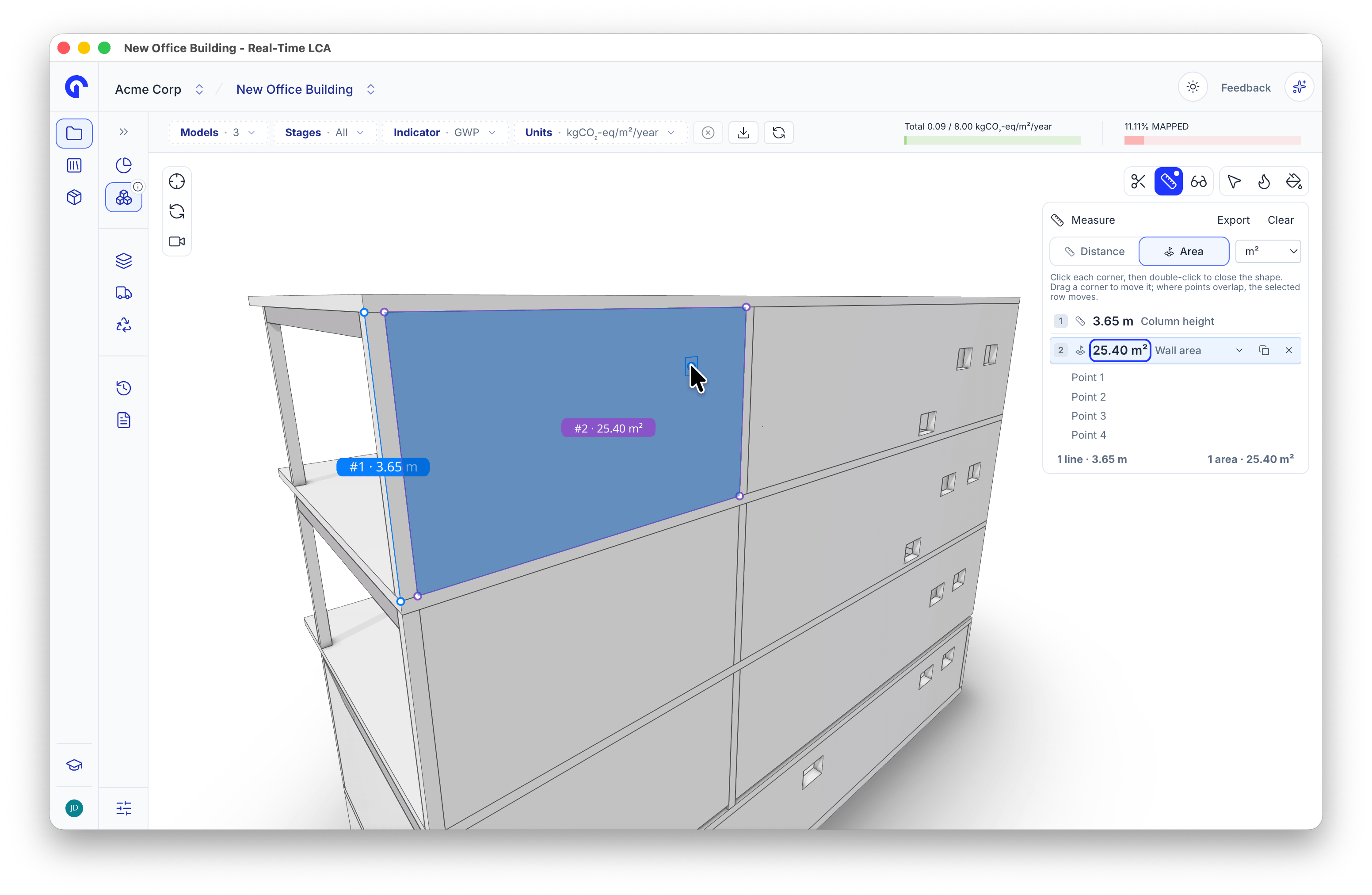
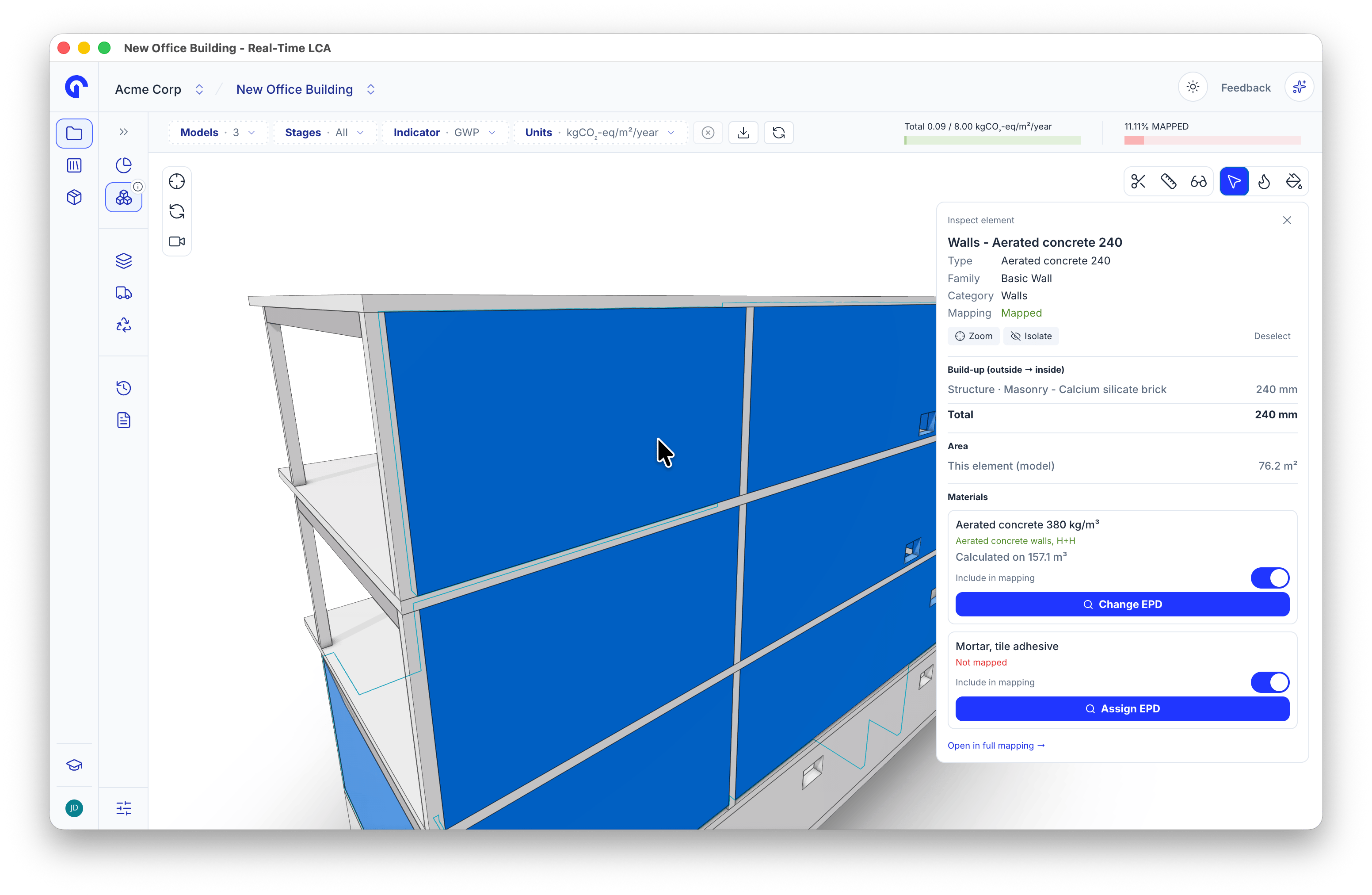
- Inspect layers: the layer build-up of walls and floors is now shown in Inspect.
- Measurement list: every measurement is collected in a list in the viewer, so you don’t have to note values down by hand.
🌙 Dark Mode
Dark mode is coming to Real-Time LCA, with a light/dark switch in the top navigation. We’ve been polishing it across the app so it holds up beyond the main views. Dropdowns, markdown tables and text blocks now follow the theme instead of flashing light-grey panels on a dark page.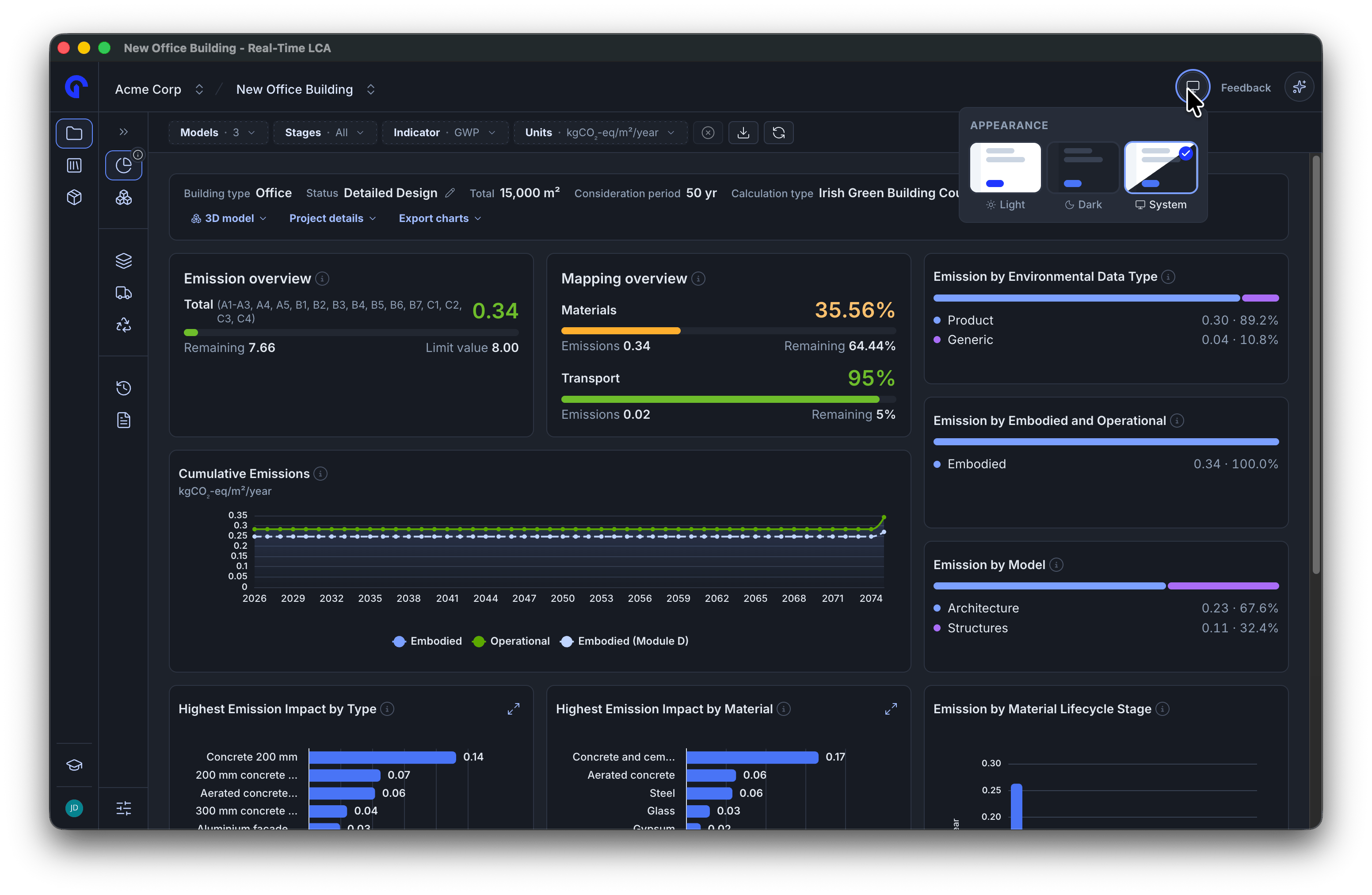
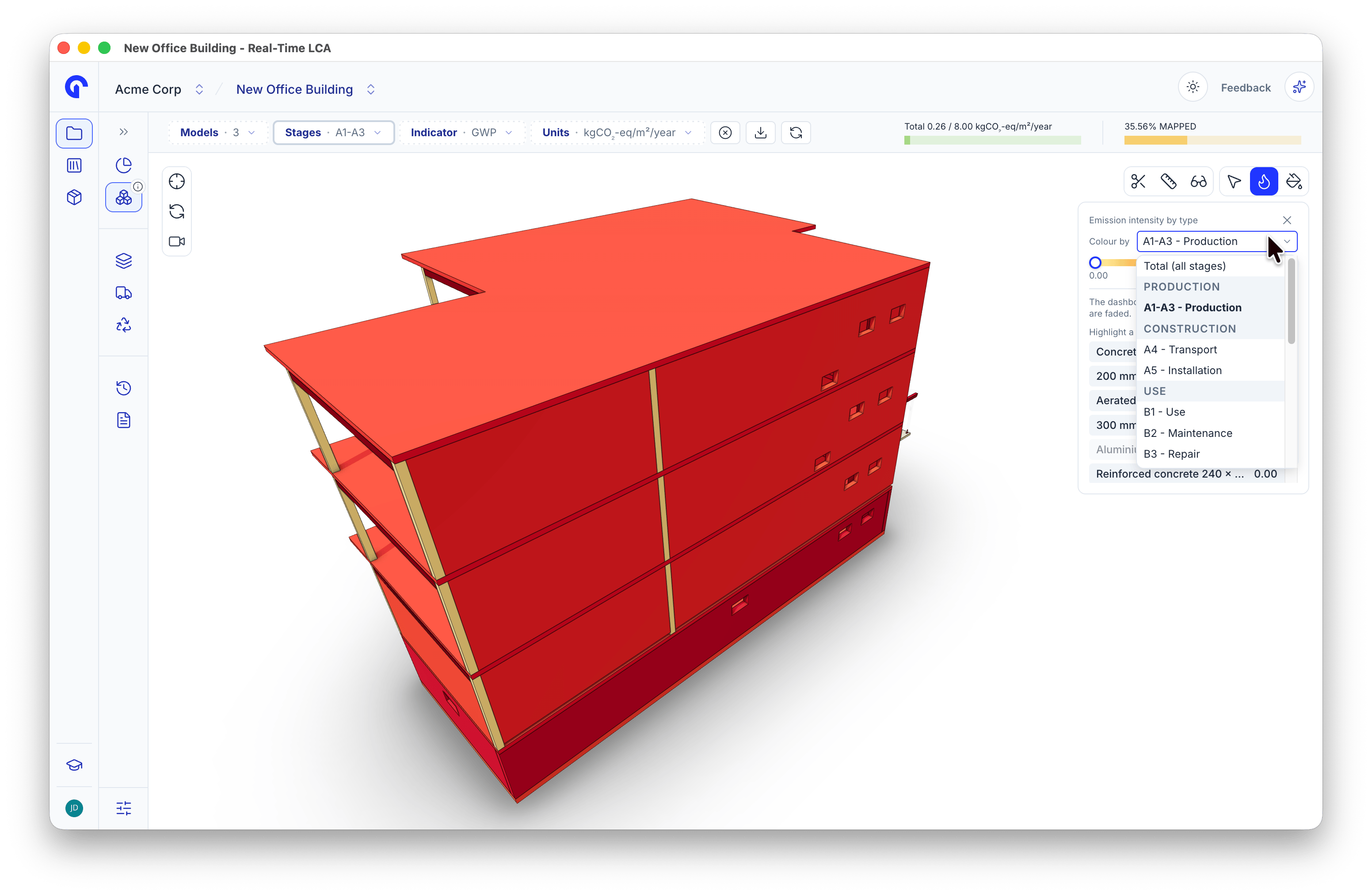
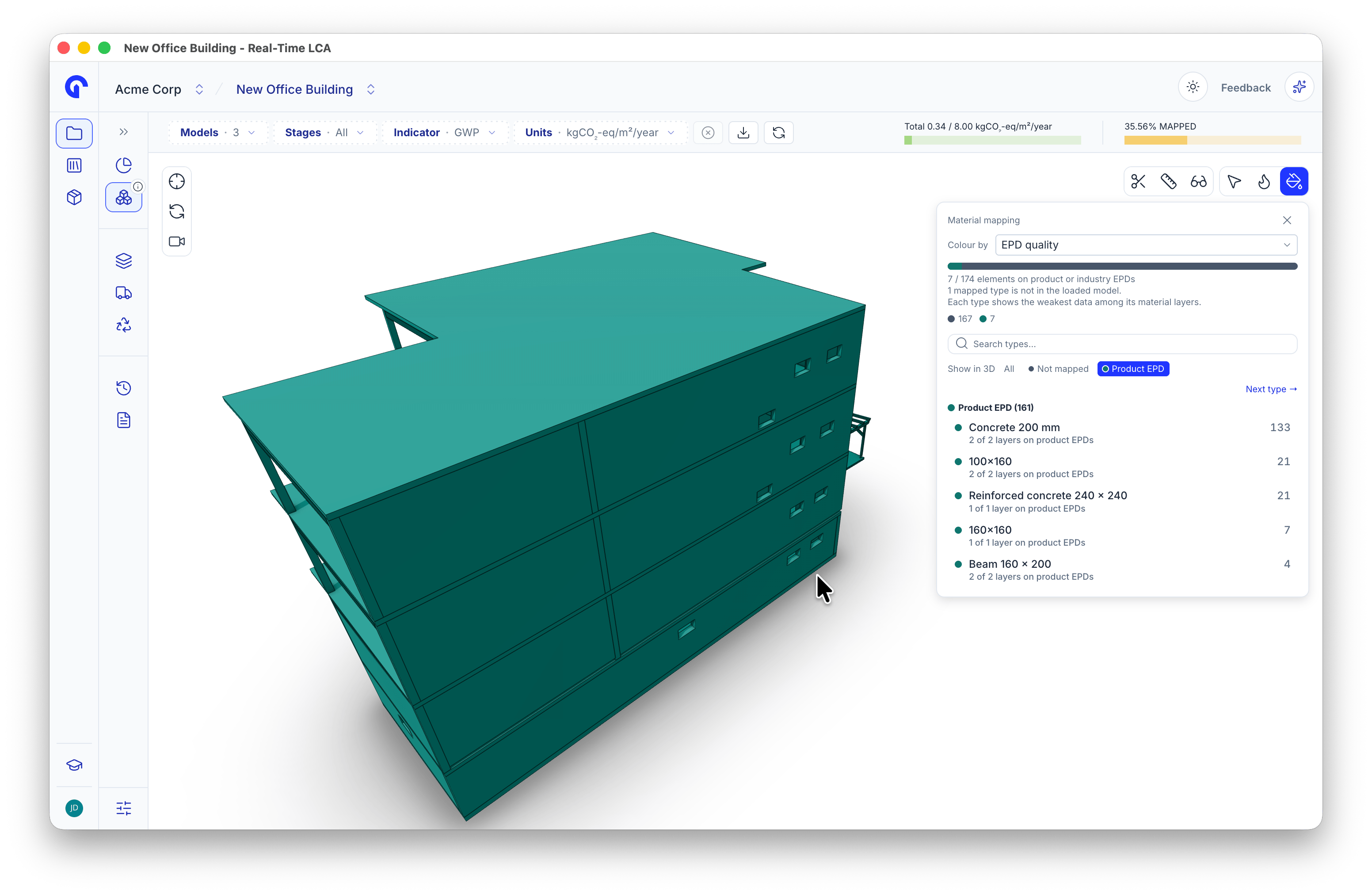
🎨 3D Viewer: Colour by More Than Total Emission
The heatmap now has a “Colour by” dropdown.- Life-cycle stage (A1-A3, B4, C…), so you can see where the replacement burden sits
- EPD quality: product-specific, industry, generic or custom
🔌 3D Viewer: Switch Materials Off and Filter Cleanly
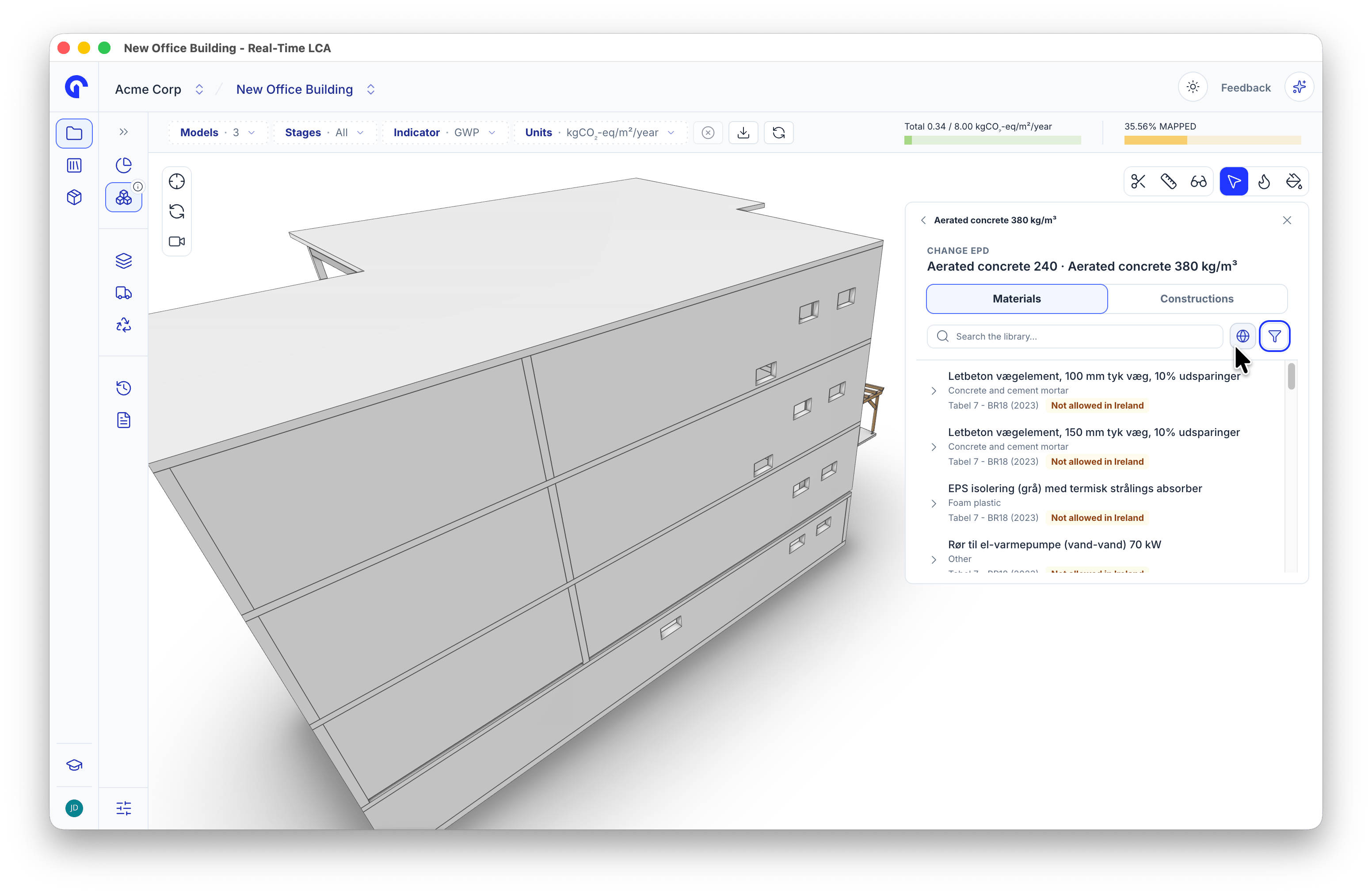
- Turn a material off in 3D, just like in Material Mapping. Excluded elements get their own grey look and an Excluded chip, so you won’t confuse them with unmapped ones.
- Filtering by mapping status now hides everything that doesn’t match, including furniture and geometry without an LCA type. Before, those elements were only greyed out, so a fully mapped building still filled the screen.
- Inspect Element is now the default tool when the viewer opens, so clicking an element works straight away.
- Disabled materials no longer show as “unmapped” in the 3D mapping view.
- EPD search in 3D mapping can be filtered by data source, so it’s easier to stay within the data allowed for your project’s country.
📊 Project Breakdown That Behaves
- The header row stays anchored while you scroll, and the table uses the full remaining height.
- Search expands only the matching branch, not the whole hierarchy. Searching for one wall type no longer buries the hit under hundreds of rows.
- The parent trail is highlighted again when you select a row, so you can see where it sits in the hierarchy.
✨ Smaller Touches
- Dragging a material from the library into the inventory now opens the group it lands in.
- Activated standard values now look active, so you can tell they’re on while they stay locked.
- The tenant selector focuses its search field on open, like the project selector.
- Construction creation now labels the field “Thickness (m)” in front of “Lambda (W/mK)”, so it’s clear what you’re entering.
- If an invited user has no Speckle user on a Speckle-connected project, you’re now told, instead of the access gap staying silent.
🐛 Bug Fixes
- 🧱 Fixed a bug where Compare constructions only compared the raw material emissions, not the full construction.
- ⭐ Fixed special conditions errors, including adding a special condition on a type.
- 🚚 The Unmapped filter now stays selected while you map transport.
- 🧩 Fixed a parent type that couldn’t be mapped after reactivating one of its children.
- ✏️ Fixed type name changes reverting after a page reload.
- 🧱 Fixed mapping a construction overwriting existing layer names.
- 📚 The library indicator filter now follows the project’s default indicator.
- 🔒 Fixed a bug where users set to Viewer could still publish 3D models to the project.
- 🤖 Fixed auto-mapping Accept/Reject breaking after you navigated away before resolving it.
- 🕓 The revision switcher now shows for users with access to all projects.
- 📋 Fixed cloning a project dropping classifications.
This release pairs a few long-awaited quality-of-life fixes with a much more useful 3D viewer. See the updated 3D model viewer and Account and user settings pages for the details. Got questions or feedback? Comment on the release post in the community or reach out directly.
September 10
The biggest release since Real-Time LCA launched. Projects are rebuilt around a single left rail, every change is now a version you can restore, milestones can be saved as named revisions, reports have a proper builder, the AI Agent can do the mapping for you — with your approval — and the AI can read an EPD PDF into the Library for you. The whole user guide has been rewritten to match. Let’s dig in:🧭 A New Project Structure
Every project now shares one left rail — Dashboard, 3D model, Materials, Transport, Waste, History, Reports, and Settings — so the same navigation follows you from an empty project through to a delivered report.Creating a project is now a short dialog: country, name, building type, calculation type, and the models the project will hold. Everything else moved into Settings.⚙️ One Settings Page
Project, building area, calculation, models, classification, transport (A4), installation (A5), energy use (B6), members, and integrations now live on a single page with one Save.- A Sections panel doubles as a table of contents and a status list — complete, edited but not saved, or needs attention before the configuration can be saved — with a plain-language count underneath.
- Your limit value shows the budget the project is judged against and where it came from.
- Manage holds the project-level actions: integrations, members, clone, and delete.
🕰️ History — Every Change Is a Version
Changes to base information, materials, and mappings are recorded as versions. Each entry carries its version number, what changed, who changed it, when, and where it came from — in-app, service, or an integration. Filter by change type, search the log, limit it by date, or export it.Restore never overwrites. It builds a new project from the state at that version — materials and project information, transport and waste mappings, custom emission factors, and the history up to that point — and leaves the original exactly as it was.🔖 Revisions — Named Save Points
Any version can be saved as a named revision: Initial Design, Detailed Design, Planning submission. The project is always on exactly one revision, and everything you do is saved to it.- Preview opens a revision read-only for any user. Continue from this moves the project’s working state onto that revision, and every open client follows live.
- Each revision shows who saved it, when, and the emission figure at that point — with the change from the previous revision beside it.
- The revision name in the breadcrumb is a switcher, available on every page of the project.
- Reports are pinned to the revision they were taken from. That is what makes a delivered number reproducible months later, after the live project has moved on.
📋 Clone, Rebuilt
Cloning now copies the project’s current state — materials, mappings, settings, team, and its history so far — into a brand-new project, leaving the original untouched. The dialog names the exact state being copied and asks what should happen to the 3D model: a new Speckle project for the clone, or the same published models feeding both.📄 The Report Builder
Reports in the project rail opens the builder: a page list, a live preview of what will print, and the three controls that apply to the whole document — a mapping incomplete warning, a marker for the pages that take your input, and the report language.- Cover carries the project name, the headline result, and your client logo.
- Overview takes your project description, a building render or photo, and the QA/QC fields, and shows which life-cycle modules the result covers.
- Results states the calculation method and every project parameter behind the number.
- Additional Results carries the ranked impacts and the cumulative curve, each with a note box beside it.
- Background Data lists the active standard values and every EPD used, with its declaration number.
🤖 The AI Agent
The agent opens beside whatever you are working on and picks up the project you are in.- It can map for you. It resolves the materials, reports what is blocking them, finds candidate EPDs, and states what it is about to do — then waits. Anything that changes data pauses for Approval needed, naming the exact operation, with Allow and Deny and the full list of tool calls it has run.
- It answers product questions from the documentation, with a Sources list linking the pages it drew on.
- Skills are reusable instructions you can attach to a message. Curated skills are maintained by us; duplicate one to adapt it, or write your own.
- Usage and History track tokens and sessions across the workspace, by month and by feature, and both export.
📑 Extract From PDF
On the Create Material form, Extract From PDF reads an EPD document and fills the form for you — name, life time, owner, data source, dates, EPD type and specification, declared and mass values with units, and the indicator tables. It takes roughly 15–60 seconds, and anything it could not find stays empty and flagged so the gaps are easy to spot.Across roughly 10,000 values from 35 test files, extraction returned 98% of the values correctly, with 11 individual entries wrong — the rest were missing or flagged for review. It is an accelerator, not a substitute for checking: review the form against the source document before you save.🏷️ AI Classification, Reworked
From Mapping tools on the Materials page, pick the building components to classify — Only unclassified hides anything that already has a code — and review the proposals in a table: existing code, object class, proposed code, whether it is a change, an AI confidence score, and a per-row Apply tick. Object class and proposed code are both editable. Accept writes the ticked rows; Reject discards the lot. What you accept is recorded in History.🧱 Mapping
- An empty project offers four ways to start: upload an IFC model, upload an Excel file, add a material or type by hand, or load a set of sample building elements. The New menu in the inventory header offers the same routes at any time.
- Drag an EPD or construction from the library onto a row, a group, or the strip at the top to drop it into a new group. Mapped rows turn green and show the EPD beneath the element name.
- The flag button limits the library to EPDs allowed for the project’s country.
- Auto Mapping lands as a preview: rows tagged Auto Mapped, the header swapped to Accept or Reject, and nothing written until you accept.
- Missing a lifetime? The app asks for it there and then, with the lifetime table one click away.
🚚 Transport and ♻️ Waste
Transport is one row per mapped material — items, tonnage, emission per tonne, and the total — with the vehicle type and distance you set, defaulting to the country’s data from Settings → Transport (A4). Waste lists your scheme’s categories on the left and the mapped materials on the right, each with the emission it contributes, the wastage assumed on top, and the mass available to sort; Assign sends a material to a category and shows the fraction percentage it represents.📚 The Library
- New in the toolbar creates a material or a construction.
- Rows now carry the EPD type, standard, dataset, declared unit, declaration number, and headline GWP, plus Valid to and an Expires soon warning when an EPD is close to its end date.
- Compare up to six materials side by side, with an attribute overview and a per-module Lifecycle Stages tab where you pick a calculation type or toggle individual stages. The comparison downloads.
- Materials show the collections they belong to as a chip on the row, so a saved material is recognisable while scrolling.
- Constructions get Edit, Clone, and Delete from the row menu, filters for units, owners, and organisations, and a dimensions dialog with a 3D preview, a lambda value for insulation, and the conversion it is making spelled out.
🎓 Tutorials, In the App
Twenty-three short walkthroughs, at the bottom of the left sidebar and available from any page — six categories, from Platform Overview through to Reports and Documentation. Cards show the category and duration, a tick marks what you have already watched, and chips filter by category. Open the player’s ⋮ menu for playback speed or Picture in Picture — the video pops out into a small floating window that stays above the app, with its own play, skip, and progress controls, so you can follow along while you work.🔌 Speckle and Imports
- You now create your own Speckle account from Account menu → Speckle, choosing the password you will use in the connector, and the dialog holds Reset password, Sync projects, and the connector download.
- A project’s connection is configured from Settings → Integrations: a new connection for its own stream, or a shared connection so two projects read the same published model. Once connected, the row reports the models in sync, when they were last published, and offers Sync now.
- Excel and IFC uploads moved to the inventory’s New menu. Imported rows are tagged with their source, the Datasource filter separates Excel from Speckle, and an imported item’s Quantity tab shows the current value alongside the original from the sheet — so an edit never hides what was uploaded.
- IFC imports run in the background: keep working, and the project updates itself when processing finishes.
📊 Dashboard and Projects
- A filter bar above the dashboard applies to every number and chart on the page — models, life-cycle stages, indicator, and units.
- Any chart opens full screen with Absolute, Relative, and Stage breakdown views.
- The project breakdown table has a column manager, including material properties and a per-stage emission split.
- The projects page adds a denser sortable list view, and each card shows the revision it is on, its % USED bar against the limit value, and % mapped so the emission figure is read in context.
💬 Help That Answers First
Feedback in the top-right corner now offers the AI Agent, the user docs, and the community before the form — and Issue and Idea still go straight to the team, with the page you were on attached automatically.📖 The User Guide, Rewritten
Every page of the user guide has been rewritten against this release, with annotated screenshots that render in both light and dark mode, and new pages for the 3D model viewer, History, Revisions, Reports, Clone a project, Extract From PDF, and Tutorials.This is the release we have been building toward since the platform launched — a project that remembers everything it has been, milestones you can name and return to, reports you can reproduce, and an assistant that does the work and asks before it writes. Tell us what to sharpen next via community.realtimelca.com.
June 19
Big stretch of work to share — from more granular control over Danish standard values, to BR18 2023 support and faster ways to find the constructions you need. Plus a milestone moment: Real-Time LCA is now live on the OpenAI / ChatGPT App Store. Let’s dig in:🤖 Real-Time LCA is Live on the ChatGPT App Store
You can now reach Real-Time LCA straight from ChatGPT. We’ve published the app to the OpenAI App Store, so you can query projects, search EPDs, map materials, and pull dashboard results without leaving your AI assistant. It’s the same toolset that powers our MCP integration, now one step closer to wherever you already work.🇩🇰 Turn Standard Values On and Off Individually
For Danish projects, you now have fine-grained control over standard values. Instead of an all-or-nothing toggle, you can activate or deactivate each value per stage, and the calculation respects exactly what you’ve turned on or off. This gives you a much more precise picture when documenting which assumptions are in play.🏗️ Special Conditions for BR18 2023
We’ve added support for distinguishing BR18 2023’s special conditions, so projects on the 2023 ruleset are handled correctly alongside the 2025 standard values. One more piece of keeping the platform aligned with the regulations you actually work under.🔍 Filter Constructions by LCAbyg (2023) and LCAbyg (2025)
Finding the right constructions just got faster. We’ve extended the filtering in the Constructions view so you can filter directly on LCAbyg (2023) and LCAbyg (2025) instead of scrolling to find what you need.✨ Smaller Touches That Add Up
A few quality-of-life improvements landed in this period too:- Full names on hover — Type and Material names that get truncated in the inventory now show in full when you hover over them.
- Three decimal places — The Material modal now accepts and preserves values to three decimal places, so you can enter more precise quantities.
These updates push toward a more precise, more flexible, and increasingly AI-assisted Real-Time LCA. As always, your feedback drives where we go next — keep it coming via community.realtimelca.com.Read the full post →
May 22
This release focuses on flow — multi-select actions across Project Overview and Library, persistent filters that remember you between visits, an inventory that holds its place, and a handful of long-awaited fixes for special conditions and the AI Assistant. Let’s dig in:☑️ Multi-Select Actions on Projects and Library
We’ve added a proper Selection mode to both Project Overview and the Library.- Select multiple projects or library items at once
- Apply actions in bulk instead of one-by-one
- Works across both views with a consistent UX
💾 Filters That Remember You
Project Overview now remembers your filters between visits. No more manually hiding “On hold” and “Archived” projects every time you open the platform — your selections persist across sessions.A small change, but one that adds up fast when you log in several times a day.🧱 Collections in the Constructions Library
The Constructions view in the Library now supports collections, just like the Materials view does. Organize your assemblies into the same logical groupings you already use elsewhere — no more switching mental models between tabs.🧭 Project Navigation, Refreshed
The in-project navigation has had a visual and structural refresh — cleaner hierarchy, clearer active states, and faster orientation when jumping between dashboard, inventory, and report views.📋 Building Component Inventory Keeps Its Place
The Building Component Inventory now preserves your expanded state and scroll position during normal use. Click into a material, hit back, and you’ll land exactly where you left off — no more re-expanding the same tree for the fifth time today.🗺️ Map Shows Your Location First
When creating a new project, the Location step now uses your browser location to show a map centered on where you are — instead of a blank page until you start typing an address.🔄 SI Agent Mapping Updates Live
When the SI Agent maps or remaps a material, the inventory now updates automatically — no manual page reload required. Mapping feedback is instant.🇸🇪 Resurs-ID on Boverket Data
Swedish Boverket materials now carry their Resurs-ID as the declaration number — making it easier to trace EPDs back to the official Boverket database entries.🇮🇸 Iceland: Corrected Installation Input Units
Adjusted the installation input denominator unit for Icelandic calculations to match the correct reference. Small change, correct results.✏️ Smaller Touches
- Decimal values are now allowed for number of persons during project creation (no more “you must enter a whole human”).
- General user feedback messages and toasts have been polished across the app.
🐛 Bug Fixes
- 🧮 Fixed a bug where adding a special condition caused total emissions to increase instead of decrease. Yes — wrong direction. Now correctly subtracts.
- 🧱 Fixed a bug where the special condition (S) button disappeared when a construction was dropped onto a parent/collection row in the inventory. Drop where you like — the button stays.
- 📐 Fixed an issue in Speckle quantity extraction (mængdeudtræk) that produced incorrect quantities on certain models.
- 🤖 Fixed the AI Assistant crashing with “Stream error occured” for some users.
- 💾 Fixed a bug where users were unable to save constructions in certain projects.
- 🪟 Fixed white-background text blocks appearing inside info modals, breaking the visual consistency of the modal.
This release leans heavily on community feedback — persistent filters, the inventory state fix, and Boverket Resurs-IDs all came directly from you. Keep it coming via community.realtimelca.com — we’re listening.Read the full post →
April 30
Three major AI features this cycle — one live, two in beta — plus reference-area improvements and a long list of fixes.RTLCA MCP Server — live for everyone- Hosted Model Context Protocol server at
https://mcp.realtimelca.com/mcp, authenticated with your existing RTLCA login (no API keys). - 53 tools across 7 areas: projects, material mapping, BIM inspection, BR18-compliant reporting, EPD/materials library, dashboards, and event histories.
- Trigger auto-classification from the material mapping view when BIM source codes are missing or incorrect.
- Suggestions appear in a review table; accept selectively before applying. AI-generated codes are labelled and should be reviewed.
- Conversational AI built natively into Real-Time LCA, powered by the MCP server.
- Generative UI components (inline charts, EPD tables, mapping previews) on the roadmap.
- Add a description to each Reference Area.
- Removed the one-entry-per-type limit — you can now add multiple Reference Areas of the same type.
- Updating material quantities or excluding materials prompts you to refresh waste sorting weights.
- Fixed calculation issue where materials with both GWP and GWP-Total could produce incorrect results after a construction update.
- Fixed error adding special conditions in the type view; Boverket generic data showing zero in Icelandic project breakdowns; login issue on Speckle Revit Connector 3.17.2; orphan Speckle projects on failed creation; inventory list colours; project card image reload; missing SC button on outer collection drag; auto-classification only sending the first material ID.
April 20
Public launch of the Real-Time LCA MCP Server — a hosted Model Context Protocol server connecting AI tools directly to your RTLCA workspace.- 53 tools across 7 functional areas: projects, material mapping, BIM inspection, LCA reports, EPD & materials library, dashboards & timelines.
- Hosted at
https://mcp.realtimelca.com/mcpwith OAuth authentication — no API keys. - Setup guides for Claude.ai, Claude Code, Codex; local LLM guide coming.
- “List all my projects and show me the GWP for each”
- “Map missing materials with most adequate EPDs”
- “Generate a BR18 XML report for project X”
- “What are five promising mitigation actions to reduce environmental impacts in the structure of this project?”
April 14
- Clone public constructions from other organisations into your own — original source tracked behind the scenes.
- Biogenic content parameters (product and packaging) can now be entered directly in the material editor.
- In-app feedback button for sending suggestions without leaving RTLCA.
- B6 energy guidance for early-stage projects — recommended maximum consumption by building typology, with Danish energy frame limits (30 or 40 + 1000/A kWh/m²/year).
- Fixed Speckle v3.15 connector breaking window/door total areas; columns not exporting length in meters; model add errors on existing buildings; collection filter mismatch;
undefineddatasources in mapping library; preferred-unit edits clearing values; mapping progress bar not auto-refreshing; missing classification codes in mapping modal; Low Emission (2025) reference area selection and transport step issues; B6 energy submission without consumption value; library filter persistence across tabs; automapping failures with mixed model types; emissions showing0in project breakdown Excel export.
March 27
Collections- Organise materials and constructions into named groups, scoped to your organisation.
- Filter by collection in the library; searchable filter.
- Side-by-side comparison of properties, EPD data, and values for multiple library items.
- Drop a material onto another in mapping view to create a new group inline.
- Better navigation back to the originating construction after edit/clone.
- Cleaner library card layout; full-width descriptions.
- Easier Speckle invite copy without trailing spaces.
- DGNB report now uses total heated area above + below ground.
- Search materials by waste group name.
- Organisation filter reset on switch.
- Window/door total area on +3.15; column units in meters; reuse activation no longer zeros A4–A5; automapping with multiple models; project overview sort headers; edit-button visibility for read-only users; library editing/cloning issues (missing clone in mapping view, pre-populated forms, deleted-material visibility, “deprecated” vs “deleted” notifications).
March 12
Waste Sorting — rebuilt from the ground up- Create custom waste groups; drag and drop EPDs from the library.
- New sidebar with emissions per waste fraction; A4 and A5 emissions correctly handled for reused materials.
- Excel import templates per country and language for bulk upload.
- Filter by EPD type, custom/standard sorting, sort by emission; toggle kg/ton.
- Default vs actual sorting clearly labelled on cards.
- Multiple selection in mapped inventory for bulk mapping.
- Reference areas, calculation types, roles, favourites all served from Hasura.
- New Filter by Role (Admin, Editor, Viewer, etc.).
- Auto-refresh when navigating back after edits.
- Multi-select projects and view key data, previews, and analytical insights in a matrix modal.
- Drop a library material onto “Create Group”; the modal pre-fills EPD name and declared unit.
- Old single-model dropdown removed; all building elements from all models now shown unified by default, with model filter in the filter panel.
- Expand/collapse all groups in BCI; redesigned projects table view; locked first row/column in lifetime table with cursor highlight; Norwegian transport factors from NS 3720:2018/G2:2024 Table 15; elevators mapped to correct classification code; datasource column in DGNB Excel; version number in DGNB report; total bar in material comparison.
- Swedish Klimadeklaration + automapping; A5 stage in Norwegian and Swedish reports; “By Project” automap blocking and missing projects; “Clear” filter behaviour; Revit category search; “Could not resolve app” in Speckle Connector; Speckle 3D view duplication viewId errors; project branch updates with missing model data; unit display in constructions; transport-by-type race condition; transport input unit; construction indicator click area; material compare indicator after dropdown selection.
- Project Overview is now lightning fast — a user with access to 75 projects went from 48 seconds to 82 milliseconds. (Yes, triple-checked.)
- Revit Room Materials now imported: Floor Finish, Base Finish, Ceiling Finish.
- Norwegian Lifetime Table based on SINTEF anvisning 700.320, fully integrated for Norwegian projects.
- Shareable material URLs — inspect any material via a library route.
- New program operators: UL Environment, Tata Steel UK Limited.
- New batch of EPDs from the community request thread.
- Invalid characters in Excel headers no longer break report generation.
- Classification codes now assigned during Excel import.
Cumulative Emissions Graph
- Year-by-year carbon timeline across the consideration period (typically 50 years) — embodied (A1–A5 in Year 0, B2/B4 distributed, C1–C4 at end-of-life, offsets allocated) and operational (B6 continuous; year-specific for Denmark, fixed average elsewhere).
- Visible on the Dashboard, in the Excel export (new sheet), and in the DGNB Conformity Check Report.
- Companion to the cumulative graph; also in the Excel export.
- Better Revit family name parsing.
- “Create Material/Construction from Mapping View” routes back to your project.
- Project carousel shows more data at a glance.
- Tags → Categories transition continues across library and platform.
- Delete imported materials directly from Excel-based inventory view.
- Excel re-import respects model assignment for shared types/materials.
- Structural column mapping issues resolved.
December 19
- Customizable Project Breakdown Table — add and rearrange columns, reset to default.
- Additional performance tuning in the Mapping View.
- Auto-Mapping can now transfer include-in-calculation toggles from template projects when overwrite is enabled.
December 15
- Mapping View completely refactored — inventory loading independent of dashboard summary and library; faster initial loads.
- In-context explanations for inputs and graphs across the platform, rolling out over the coming weeks.
- Real-Time remembers — library filters and Mapping View model selector retain your last selection.
- Auto-Mapping rewritten — uses project history for better, faster matches; project-based auto-mapping with overwrite now also ticks “include in calculation”.
- Highest Emission Impact by Material now calculated correctly for constructions.
December 3
- Mapping View rebuilt — 60% faster on average, up to 400% on complex projects.
- BR18 2025 Excel export updated: A4, A5, and Special Conditions now reported; all materials shown even when classification is missing/incorrect.
- Deprecated material tags surfaced in Mapping View.
- New tenant-wide role — see all projects in the tenant (contact support@realtimelca.com).
- Curtain Walls from Speckle Revit Connector — Total Area now computed correctly.
- Icelandic projects B6 — input now correctly divided by years.
- Transport mapping — removing a mapping no longer blocked.
- Upload IFC models directly — automatic material quantity extraction, alongside Revit, Rhino, and Archicad via Speckle Nextgen.
- Special Conditions for BR18 2025 — better reflect realistic emissions for pile foundations, challenging ground conditions, special-use buildings. Filterable.
- DGNB Conformity Check Report for Danish DGNB-targeted projects.
- 3D Viewer upgrades — view modes and section tool.
- New Legislation section in Project Info carousel.
- EPD search by declaration number.
- Excel upload improvements with clearer error feedback.
- Irish Green Building Council (IGBC) generic data added.
- Wall length calculation supports multiple material layers.
- Safari dropdown styling.
September 26
3D Viewer launched- 3D Viewer live — visualise where emissions are coming from in your building; identify hotspots and opportunities.
- Speckle Nextgen fully supported for Revit, Rhino, and Archicad.
- Project preview thumbnails gently rotate on hover.
- “Parts” from Revit now recognised.
- Negative quantities from Rhino models handled gracefully.
September 1
BR18 2025 — deeper compliance- Standard values for terminal processes.
- Low Emission 2025 introduced as a calculation type.
- Multiple fuels supported for A5 stage.
- Reports reflect the correct new thresholds.
- LCA Responsible assignable in project settings.
- Number of Users / Persons drives per-person insights in the project info carousel.
- Overwrite EPD lifetimes when mapping.
- +200 constructions from Byggforsk.no, findable via the new Owner filter.
- +50 new manufacturer EPDs (BMI, Boligbeton, CRH Concrete, DAFA, Flügger, Forbo, Gemina Termix, Hunton Fiber, Leth Beton, Moland, Palsgaard, Phønix Tag, Vejle Kalk- og Mørtelværk, and more).
- All public materials/constructions set non-public by default pending automatic QA.
- Transport and waste mapping stability.
- Contributors can no longer assign Admin roles.
- Speckle servers upgraded — Nextgen Connectors now supported; native 3D Model Viewer coming.
Full support for BR18 2025
- New calculation type with auto-set thresholds by building type and area.
- Updated emission factors.
- Waste mapping overhaul — Table 11 generic data for construction waste treatment.
- Transport mapping — Table 8.2 (fuel emission factors) and Table 10 (A4/A5 energy consumption).
- New & improved Excel template.
- Update existing quantities via re-upload — no manual matching.
- Slab Edges and Entourage now supported in calculations.
- IBU.data re-imported.
- Added AP, PERE, and FW indicators.
- Cleaner Projects grid layout.
- AddMaterial API accepts arrays.
- Language switcher in Profile Settings.
- Edit Construction — most-requested feature, now live.
- Clone Construction for rapid design iteration and versioning.
- NTI country coverage — projects can be created in all NTI countries.
- LEVEL(s) calculation type across all countries.
- BR18 2025 generic dataset (Table 7) added ahead of full compliance.
- Operation Energy Use (B6) visible in the project data carousel on Insights.
- Rhino classification via Attribute User Text — send classification codes from Rhino.
- ArchiCAD classification code parser — automatic import, no manual mapping.
- Revit assemblies — elements within assemblies now supported.
- Gutter support via Speckle View Selection.
- REST API documentation overhaul at docs.realtimelca.com.
- Ökobaudat 2021, 2023, and 2024 datasets re-imported with higher quality.
- Iceland and Faroe Islands now officially supported, with localised data and regulations.
- HMS calculation type for Icelandic projects.
- Emission values for A5 and B6 stages added.
- CCI classification available.
- CCS classification also added.
- Lifetime offset for materials — shift material lifetimes from a base year for future emission projections (great for facility management).
- LCAbyg constructions usable directly in RTLCA.
- Streamlined material creation workflow.
- Construction validation deployed; filter constructions by Owner.
- Material comparison: compare different indicators side by side.
- Wall Sweeps added to the element category list.
- Lifetime offset reflected in Project Breakdown.
- Publishing materials/constructions to all users temporarily disabled pending automatic QA.
- EPD Norway datasets that didn’t meet QA removed.
- Earth moved by machinery — unit corrected to volume (m³).
- Boverket calculation type fully supported.
- Boverket-specific transport emissions and A5 emission factors.
- Swedish building types.
- Reporting follows EN 15978:2012.
- Project Breakdown with BSAB codes.
- EPD owner creation no longer requires email.
- Classification optional when creating custom types/materials in mapping view.
- Description field on new types/materials.
- More indicators in Insights.
- Create Material/Construction directly from Mapping view.
- Tons automatically converted to kg.
- Full Norwegian support — creation, calculation, and reporting per local requirements.
- All EPD Norway and Boverket materials translated (Norwegian, Swedish, Danish, English, German).
- Norwegian Classification system supported when creating materials and types.
- Norwegian classification parameters for Speckle.
- Project Breakdown supports NS3451.
- Tabell 8-1 implemented (official greenhouse gas accounting template for TEK17 § 17-1).
- Indicator filter in the Library; Library search auto-filters by calculation type indicator.
- Delete constructions created by your organisation. Clone and Edit coming.
- Emission results shown on material and transport mapping cards.
- Rhino connection now finds material quantities in nested block instances.
- Norwegian projects — expanded support, with Sweden and Iceland on the way.
- New Insights tab.
- Year of Construction on projects for more precise calculations.
- Combine multiple filter criteria in the Material Library.
- Edit, Clone, and Delete materials created by your organisation.
- Project Creation/Edit redesign; updated Project Cards.
- Default suffixes for Indicator/Unit selections in Insights.
- Classification Code dropdown now searchable and clearable in BCI.
- Material library shows only materials available for the selected Indicator.
- Additional emission data 2025–2075.
- New EPDs from Boverket, Ökobaudat 2024-1, EPD Norway.
- Drilldown functionality in Highest Emission by Type and by Material graphs.
- Project Breakdown re-introduced — flexible, searchable, Excel-exportable.
- Inspect Modal for transparent access to underlying data; column chart now shows a Total.
- Clone Project for variant studies at the project level.
- New EPDs added by community request (Deltabeam, Ytong, Ardex, recycled crushed concrete/asphalt, lime-stabilised soil, reused bricks, and more).
- More welcoming and interactive Insights View on new projects.
- Classifications set in the platform no longer overwritten by empty classifications in updated models.
- Insights view — completely new, packed with functionality:
- Change Indicator and Unit directly in the view (e.g. kgCO2-eq per m², Ozone Depletion Potential).
- Filter Stages, affecting all graphs.
- Generic Excel export of active Insights data.
- Animated, responsive graphs with a calmer colour palette.
- Conditional colour formatting for mapping status (materials, transport, emission overview).
- Project Data (calculation type, areas, location) shown directly on the page.
- Richer tooltips.
- Address inputs enabled for Iceland, Norway, Sweden — first step toward full support.
- More EPDs added by community request.
- Lifetime table — left pane locked for easier vertical scrolling.
- Filter materials and constructions by organisation — show only items made by your organisation or Gaiup.
- Iceland support for LCAs (building regulations aligning with Denmark in 2025).
- New UI in the mapping view aligned with transport mapping.
- New UI in BCI for adding types/materials with unit specified up front.
- EPD Hub welcomed as a data source.
- How-To videos for Grasshopper and Rhino connectors.
- Transport (A4) — calculate using EPD datasets and custom transport types, distances, and emissions.
- More Speckle Connectors — ArchiCAD, Rhino, and Grasshopper now supported.
- BCI UI aligned with the new Transport Mapping view.
- Set unit when creating custom types/materials; set/change classification code; rename types/materials without breaking updates; add description field.
- Sort BCI by Name and Amount; emissions sort coming.
- Material/type amounts surfaced so you can focus on highest-impact items.
- BCI search now searches Category.
- Revit Gutters supported.
- EPD lifetime can be set to 0 when not applicable; EPD version optional on creation.
- Owners can be created with addresses outside Denmark.
- When mapping an EPD, assign the same lifetime to all children.
- Enter key now saves and closes modals.
- Automapping — Most Frequent, Most Recent, or By Project.
- Create Owner directly in the Create Material view.
- Compare Projects — up to 5 projects across phases.
- Building Component Inventory — new filters by mapping state and data source.
- Data ingestion rebuilt to handle ECO Portal’s 10k+ machine-readable EPDs.
- New EPD data source: ØKOBAUDAT 2023-1.
- ØKOBAUDAT 2021-II updated.
- EPD Norway updated; existing data issues fixed.
- Life Cycle inventory filters.
- Building types translated to English.
- Manage users directly from the Project Card.
- Empty search results encourage users to create the missing project/material/construction.
- Speckle 2.17 support; warning after material creation; structural foundations / ramps / railings display; project edits with 2023 start dates; spinning button during predefined material creation; unsupported media type on Excel upload; “no owners found” on Create Material search.
- Construction Library — create, compare, and add constructions to projects.
- Favourite projects for easier access.
- Better insights — lifetime and applied material shown in the breakdown table; drill from construction down to applied materials and EPDs.
- Versioned materials — the underlying data model now supports updating materials in the platform.
- Stability and performance improvements throughout.
- Negative numbers accepted for electricity consumption.